* Please review this entire guide before operating the printer.
This is a class A product. In a domestic environment, this product may cause radio interference, in which case the user may be required to take adequate measures.
Please read the safety information to ensure that you use the appliance safely.

General Information
You can find general information about this instruction manual here.
§ Read this instruction manual carefully. Only this will ensure you use the appliance safely and efficiently.
§ This manual is intended for the installer and the user of the appliance.
§ Follow the safety instructions and warnings.
§ Keep the instruction manual and the product information safe for future reference or for the next owner.
§ Check the appliance after unpacking it. Do not connect the appliance if it has been damaged in transit.
§ If you have any questions, please contact our local service center or distributors.
§ Any failure and losses caused by ignoring the following items mentioned, and cautions mentioned in the operation and installation instruction are not covered by our warranty and any liability.
Intended Use
Read the information on intended use to ensure that you use the appliance correctly and safely.
Only use this appliance:
§ According to this installation and instruction manual. Make sure to follow the installation and instruction manual for the hardware installation and resin loading, as detailed in “Raise3D DF2+ 3D Printer User Manual”.
§ In a well-ventilated and dry environment;
§ The environmental conditions used are:
Ÿ The Operating Ambient Temperature: 15-30 °C, 10-90% RH non-condensing;
Ÿ The Storage Temperature: -25 °C to +55 °C, 10-90% RH non-condensing.
Restriction on User Group
§ Keep children, pets and vulnerable people away from the appliance.
§ This equipment is not suitable for use in locations where children are likely to be present.
§ This equipment is only allowed to be used by skilled personel. This appliance may be used by people who have reduced physical, sensory or mental abilities or inadequate experience and/or knowledge, provided that they are supervised or have been instructed on how to use the appliance safely and have understood the resulting dangers.
Safe Installation
Take note of the safety instructions when installing the appliance.
WARNING - Risk of Electric Shock!
§ Improper installation is dangerous.
Ÿ Connect and operate the appliance only in accordance with the specifications on the rating plate.
Ÿ Connect the appliance to a power supply with alternating current only via a properly installed socket with earthing.
Ÿ The protective conductor system of the domestic electrical installation must be properly installed. The installation must have a sufficiently large cross section.
Ÿ Please ensure that the power supply system (current, voltage and cables) can meet the normal load requirements of the electrical appliances.
Ÿ Never equip the appliance with an external switching device, e.g., a timer or remote control.
Ÿ When installing the appliance, check that the power cable is not trapped or damaged.
Ÿ Select the fuse according to the fuse safety identification requirements.
Ÿ The power plug and the socket must be matched, and the grounding wire must work properly, and the socket must be properly grounded.
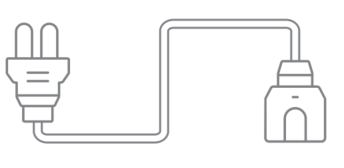
§ If the insulation of the power cord is damaged, this is dangerous.
Ÿ Never let the power cord meet hot appliance parts or heat sources.
Ÿ Never let the power cord meet sharp points or edges.
Ÿ Never kink, crush or modify the power cord.
§ If touching the printer shell reveals an electrostatic inductance, when the printer is energized, this is an indication the printer in the home is not well grounded. Please stop the printer and repair the power connection immediately to ensure a good grounding.
§ Do not connect the power supply with wet hands.
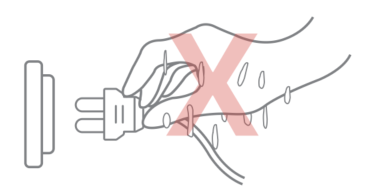
§ If you have any questions, please consult a professional electrician.
WARNING ‒ Risk of Fire!
§ It is dangerous to use an extended power cord and non-approved adapters.
Ÿ Do not use extension cables or multiple socket strips.
Ÿ If the power cord is too short, contact Customer Service.
Ÿ Only use adapters approved by the manufacturer.
WARNING ‒ Risk of Injury!
§ The high weight of the appliance may result in injury when lifted.
Ÿ Do not lift the appliance on your own.
WARNING ‒ Risk of Suffocation!
§ Children may put packaging material over their heads or wrap themselves up in it and suffocate.
Ÿ Keep packaging material away from children.
Ÿ Do not let children play with packaging material.
CAUTION ‒ Risk of Chemicals!
§ Liquid photosensitive resin: inhalation, ingestion and direct contact may cause respiratory tract infection, digestive tract infection and allergic reaction.
Ÿ Please read the safety instructions (MSDS) carefully before installing the liquid photosensitive resin.
Ÿ Please install the liquid photosensitive resin in a well-ventilated environment.
Ÿ Please wear personal protective equipment (such as gas masks, gloves, and goggles) during the installation of liquid photosensitive resin.
CAUTION ‒ Risk of Injury!
§ The appliance may vibrate when in use.
Ÿ Place the appliance on a clean, even, solid surface.
§ If tubes and power cords have been laid incorrectly, this causes a tripping hazard.
Ÿ Lay tubes and power cords in such a way that there is no risk of tripping.
§ If the appliance is moved by holding onto protruding components, such as the appliance door, the parts may break off.
Ÿ Do not move the device by holding onto protruding parts.
CAUTION ‒ Risk of Cutting!
§ Touching sharp edges on the appliance may lead to cuts.
Ÿ Do not touch the sharp edges on the appliance.
Ÿ Wear protective gloves when installing and transporting the appliance.
Safe Use
Follow these safety instructions when using the appliance.
WARNING - Risk of Electric Shock!
§ If the appliance or the power cord is damaged, this is dangerous.
Ÿ Never operate a damaged appliance.
Ÿ Never pull on the power cord to unplug the appliance. Always unplug the appliance at the mains.
Ÿ If the appliance or the power cord is damaged, immediately unplug the power cord.
Ÿ Call Customer Service, please refer to the “Raise3D DF2+ 3D Printer User Manual”.
Ÿ Repairs to the appliance should only be carried out by trained specialist staff.
§ An ingress of moisture can cause an electric shock.
Ÿ Never expose the appliance to intense heat or humidity.
Ÿ Do not use steam cleaners or sprays to clean the appliance.
WARNING ‒ Risk of Harm to Health!
§ Children can lock themselves in the appliance, thereby putting their lives at risk.
Ÿ Do not install the appliance behind a door as this may obstruct the appliance door or prevent it from opening.
Ÿ With redundant appliances, unplug the power cord and turn off the power.
WARNING ‒ Risk of Suffocation!
§ Children may breathe in or swallow small parts, causing them to suffocate.
Ÿ Keep small parts away from children.
Ÿ Do not let children play with small parts.
CAUTION ‒ Risk of Injury!
§ The covering plate may break if you stand on or climb onto the appliance.
Ÿ Do not stand on or climb onto the appliance.
§ The appliance may tip over if you sit on or lean against the open door.
Ÿ Do not sit on or lean against the appliance door.
Ÿ Do not place any objects on the appliance door.
§ Reaching into the chamber while the Z-axis system is still moving may cause hand injuries.
Ÿ Wait for the Z-axis system to come to a complete stop before reaching inside.
§ The scraper provided in the accessory box has sharp parts. If the scraper is used improperly, the user may be injured.
Ÿ Do not touch the edge of the scraper.
Ÿ Keep children away from the scraper.
§ Some parts in the printer are sharp and may cause injury.
§ When removing the prints, please refer to the “Raise3D DF2+ 3D Printer User Manual”.
CAUTION ‒ Risk of Burns!
§ When operating or printing at high temperatures, the shell of the appliance becomes hot.
Ÿ Do not touch the surface of the heating assembly when heating the appliance.
Ÿ Please operate with the heat-resistant gloves.
Ÿ Keep children away from the heated heating assembly.
Ÿ Note that the smart build platform becomes hot when the chamber is heated.
§ The temperature is very high when the heating fan is running or the printing has just been finished.
Ÿ Do not touch the heating fan while the appliance is working.
Ÿ Keep a safe distance when opening the door while the appliance is working to avoid being burned by hot air flow.
CAUTION ‒ Risk of Chemicals!
§ Safety of Liquid photosensitive resin: inhalation, ingestion and direct contact may cause respiratory tract infection, digestive tract infection and allergic reaction.
Ÿ Please carefully read the safety instructions (MSDS) before installing the liquid photosensitive resin.
Ÿ Please install the liquid photosensitive resin in a well-ventilated environment.
Ÿ Please wear personal protective equipment (such as gas masks, gloves and goggles, etc.) during the installation of liquid photosensitive resin to avoid skin and eye contact.
Ÿ Do not ingest liquid or solid resin. If accidentally swallowed, immediately call the poison control center or a medical professional.
Ÿ When handling liquid resin, resin coating surfaces, or solvent, please wear gloves. Rinse skin with plenty of soap and water.
§ Safety of liquid resin storage and expiry:
Ÿ Resin in a resin bottle: Store in an environment between 5 °C and 25 °C. Place the resin box upright and facing upwards, in a well-ventilated area away from direct sunlight. Shake the resin box at least every two weeks to ensure thorough mixing of the resin.
Ÿ Resin in the printer resin tank: Cover the resin tank tightly for storage (It’s recommended to use it up within 2 weeks). If the printer is not used for more than two weeks, it is recommended to remove the resin tank from the printer and store it separately.
Ÿ Regularly check the area where the resin is stored for any resin leakage or spillage. If there is any, clean the spilled resin with soap and water.
§ Safety of resin disposal:
Ÿ The disposal method for liquid resin is to dispose of it in a chemical waste dump or to discard it as household waste after it has been completely solidified. Do not pour liquid or partially solidified resin or solvent into the sewer, or dispose of them with household waste. Properly handling resin can prevent harm to the environment and public health.
§ Safety of cleaning solvent: using isopropyl alcohol (IPA) or alcohol as cleaning solvent can pose safety and health hazards if not used properly.
Ÿ Please obtain safety instructions and guidance from the cleaning solvent supplier and follow the safety instructions for use. The flash point of IPA and alcohol is below standard room temperature (about 20°C/68°F), so they will produce enough vapor in their natural state to form a potential explosive gas layer.
Ÿ According to local regulations, IPA and alcohol may be difficult to purchase or use in buildings.
Ÿ Please use flammable cleaning solvent in a ventilated environment away from heat sources, open flames, or sparks.
Ÿ Please wear personal protective equipment during use.
Ÿ Although the cost of IPA and alcohol is low, their evaporation rate is fast and IPA may need to be replaced frequently to effectively clean parts, so the actual operating costs may be higher than expected.
CAUTION ‒ Risk of UV Radiation!
§ Direct exposure to radiation from UV light sources may cause skin and eye burns.
Ÿ Do not stare directly at UV radiation light and wear UV protective goggles when using this appliance.
Ÿ Do not expose yourself directly to radiation range from the UV light for a long time.
Safe Maintenance
Take note of the safety instructions when performing maintenance work on the appliance.
WARNING - Risk of Electric Shock!
§ Improper repairs are dangerous.
Ÿ Repairs to the appliance should only be carried out by trained specialist staff.
Ÿ Only use the manufacturer's original spare parts and original accessories when repairing the appliance.
Ÿ If the power cord of this appliance is damaged, it must be replaced by the manufacturer, the manufacturer's Customer Service or a similarly qualified person in order to prevent any risk.
§ An ingress of moisture can cause an electric shock.
Ÿ Do not use steam cleaners or sprays to clean the appliance.
WARNING ‒ Risk of Injury!
§ The use of non-original spare parts and non-original accessories is dangerous.
Ÿ Only use the manufacturer's original spare parts and original accessories.
CAUTION ‒ Risk of UV Radiation!
§ Direct exposure to radiation from UV light sources may cause skin and eye burns.
Ÿ Do not stare directly at UV radiation light and wear UV protective goggles when using this appliance.
Ÿ Do not expose yourself directly to radiation range from UV light for a long time.
High Temperature Surface: The high temperature surface mark indicates that the surface temperature is very high. Be careful when working around heating components. Please wait for half an hour after turning off the printer before handling the parts to avoid scalding your fingers.

UV Radiation: UV radiation mark indicates the existence of ultraviolet light source. Please wear protective equipment to avoid direct exposure to UV radiation.

Moving Parts: Do not put fingers, clothing or hair into gears and other hazardous parts to avoid electric shock, injury, fire, or damage to the device.

High Voltage: The high voltage sign indicates the presence of high voltages. Always stay away from exposed circuitry. It is recommended that all conductors be removed.
Replacement Fuse Identification and Rating Markings: Identification of a suitable replacement fuse shall be marked adjacent to the fuse holder.
Protective Earthing Conductor Terminal: Marked near the protective earthing conductor terminal.

FCC Statement
Please be aware that changes or modification not expressly approved by the party responsible for compliance could void the user’s authority to operate the equipment.
This device complies with Part 15 of the FCC Rules. Operation is subject to the following two conditions:
(1) This device may not cause harmful interference, and
(2) This device must accept any interference received, including interference that may cause undesired operation.
This equipment complies with FCC radiation exposure limits set forth for an uncontrolled environment. This equipment should be installed and operated with minimum distance 20cm between the radiator & your body.
IC Caution
The device meets the exemption from the routine evaluation limits in section 2.5 of RSS 102 and compliance with RSS-102 RF exposure, users can obtain Canadian information on RF exposure and compliance.
This device contains licence-exempt transmitter(s)/receiver(s) that comply with Innovation, Science and Economic Development Canada’s licence-exempt RSS(s). Operation is subject to the following two conditions:
(1) This device may not cause interference.
(2) This device must accept any interference, including interference that may cause undesired operation of the device.
This equipment should be installed and operated with a minimum distance of 20 cm between the radiator and your body.
EU Conformity Statement
| This product and-if applicable-the supplied accessories too are marked with “CE” and comply therefore with the applicable harmonized European standards listed under the RE Directive 2014/53/EU, the EMC Directive 2014/30/EU, the LVD Directive 2014/35/EU, the RoHS Directive 2011/65/EU, the MD Directive 2006/42/EC. |
| 2012/19/EU (WEEE directive): Products marked with this symbol cannot be disposed of as unsorted municipal waste in the European Union. For proper recycling, return this product to your local supplier upon the purchase of equivalent new equipment, or dispose of it at designated collection points. For more information see: http://www.recyclethis.info. |
| 2006/66/EC (battery directive): This product contains a battery that cannot be disposed of as unsorted municipal waste in the European Union. See the product documentation for specific battery information. The battery is marked with this symbol, which may include lettering to indicate cadmium (Cd), lead (Pb), or mercury (Hg). For proper recycling, return the battery to your supplier or to a designated collection point. For more information see: http://www.recyclethis.info. |
UKCA Conformity Statement
| This product is marked with "UKCA" and in conformity with the relevant UK statutory requirement: Radio Equipment Regulations 2017. The full text of the UK declaration of conformity is available at https://www.raise3d.com. |
UK sales partner company name: 3DGBIRE Ltd UK sales partner company address: 3DGBIRE, Unit 44/45 Chorley North Industrial Estate, Drumhead Road, Chorley, Lancashire, PR67BX | |
Electromagnetic Compatibility - EMC
Simplified EU Declaration of Conformity
Raise3D declares that this device is in compliance with the essential requirements and other relevant provisions of Directive 2014/53/EU. Full text of the EU declaration of conformity is available at https://www.raise3d.com.
RF Exposure Information
This device has been tested and meets applicable limits for Radio Frequency (RF) exposure.
This equipment must be installed and operated in accordance with provided instructions and the antenna(s) used for this transmitter must be installed to provide a separation distance of at least 20 cm from all persons and must be co-located or operating in conjunction with any other antenna or transmitter.
CE&UKCA Mark Warning
The device is restricted to indoor use only when operating in the 5150 to 5250 MHz frequency range.
|
| ||||||
| BE | EE | HR | IT | CY | LV | LT |
BG | IE | LU | HU | MT | NL | AT | |
CZ | EL | PL | PT | RO | SI | SK | |
DK | ES | FI | SE | DE | FR | LI | |
NO | IS | CH | TR | UK(NI) | UK |
|
CE&UKCA Output power table:
Function | Frequency | Power |
Wi-Fi | 2.4GHz | 19.99dBm |
5GHz | 22.99dBm |
Installation
To facilitate operation and maintenance, maintain a proper clearance of 30 cm (11.9 in) on the side of the printer, 40 cm (15.8 in) on the front, 20 cm (7.9 in) on the back, and 20 cm (7.9 in) on the top during installation. No flammable materials are allowed around the installation location.
Note: During low-temperature transportation, the printer may encounter frost or icing hazards. The printer should be stored at room temperature for 4-6 hours before operating.
Resin
It is strongly recommended to use Raise3D official resins and/or default settings for better performance. The Raise3D printer is designed with strong compatibility with Raise3D official resins. Be extremely careful when printing with unverified resins and settings to prevent abnormal printing results or damaging the printer.
Odor
The printer may emit the odor of light-cured resin during operation.
Note: Place the printer in a well-ventilated and dry environment.
Airborne oil accumulating inside the printer may damage plastic parts. Air in a cavity with excessive solid particles (conductive or non-conductive) may cause damage to the printer.
1. Lists of Main Parts
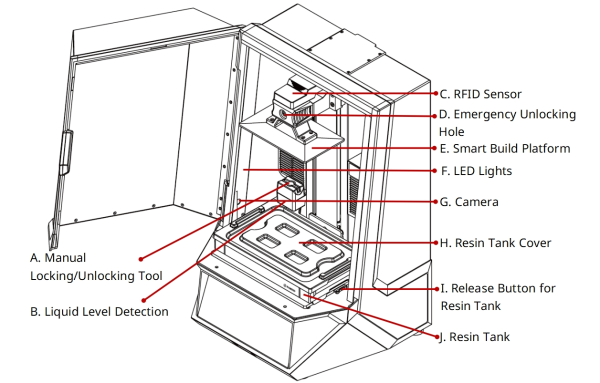
A. Manual Locking/Unlocking Tool
Storage for the key used to manually lock/unlock the smart build platform.
B. Liquid Level Detection
Measures the resin level inside the resin tank.
C. RFID Sensor
Uses RFID tags and readers to achieve information transmission and identification between the DF2+ and the Wash/the Cure, as well as between the printer and the resin tank.
D. Emergency Unlocking Hole
The smart build platform will be locked/unlocked automatically by default. In case of power failure or printer malfunction, the key described in A can be inserted into this lock hole for emergency manual locking/unlocking.
E. Smart Build Platform
The platform for printing models is easy to disassemble.
F. LED Lights
When the printer is on standby, the LED lights remain constantly on; while printing, the LED lights flash slowly at a uniform speed; when printing is complete, the LED lights flash quickly; during sleep or shutdown, the LED lights switch off.
G. Camera
Allows you to observe the printer operating.
H. Resin Tank Cover
The cover of the resin tank containing liquid resin needs to be removed before printing.
I. Release Button for Resin Tank
The buckle to secure the resin tank in place, and press the button to remove the resin tank.
J. Resin Tank
The tank for holding liquid resin has a pouring spout with a maximum capacity below the tick mark on the tank. The resin tank is a consumable, which should be replaced regularly.
1. Resin Introduction
The DF2+ uses photosensitive resin as printing consumables. Its physical form is flowing liquid, gray, with a slight odor, slightly soluble in water, and 6.5-7.5 (PH) value. Its main component is acrylic resin. Please carefully read the resin MSDS document before use.
Photosensitive resin will not cause harm under normal use. Avoid contact with skin or eyes, and assure the existence of sufficient ventilation when in use. Aerosols may irritate the nose and throat, and excessive inhalation may cause drowsiness, and a large amount of inhalation may cause respiratory discomfort, nausea, delusion, headache, and excitement. Repeated or prolonged contact with skin may cause slight irritation. Direct contact with eyes may cause slight irritation. A large amount of ingestion can cause stabbing pain, headache, vomiting, gastroenteritis, and stomach oppression.
Photosensitive resin is suitable for teaching and research, toy design, handicraft design, industrial parts design, etc.
A. Manual Locking/Unlocking Tool
Storage for the key used to manually lock/unlock the smart build platform.
B. Liquid Level Detection
Measures the resin level inside the resin tank.
C. RFID Sensor
Uses RFID tags and readers to achieve information transmission and identification between the DF2+ and the Wash/the Cure, as well as between the printer and the resin tank.
D. Emergency Unlocking Hole
The smart build platform will be locked/unlocked automatically by default. In case of power failure or printer malfunction, the key described in A can be inserted into this lock hole for emergency manual locking/unlocking.
E. Smart Build Platform
The platform for printing models is easy to disassemble.
F. LED Lights
When the printer is on standby, the LED lights remain constantly on; while printing, the LED lights flash slowly at a uniform speed; when printing is complete, the LED lights flash quickly; during sleep or shutdown, the LED lights switch off.
G. Camera
Allows you to observe the printer operating.
H. Resin Tank Cover
The cover of the resin tank containing liquid resin needs to be removed before printing.
I. Release Button for Resin Tank
The buckle to secure the resin tank in place, and press the button to remove the resin tank.
J. Resin Tank
The tank for holding liquid resin has a pouring spout with a maximum capacity below the tick mark on the tank. The resin tank is a consumable, which should be replaced regularly.
1. Resin Introduction
The DF2+ uses photosensitive resin as printing consumables. Its physical form is flowing liquid, gray, with a slight odor, slightly soluble in water, and 6.5-7.5 (PH) value. Its main component is acrylic resin. Please carefully read the resin MSDS document before use.
Photosensitive resin will not cause harm under normal use. Avoid contact with skin or eyes, and assure the existence of sufficient ventilation when in use. Aerosols may irritate the nose and throat, and excessive inhalation may cause drowsiness, and a large amount of inhalation may cause respiratory discomfort, nausea, delusion, headache, and excitement. Repeated or prolonged contact with skin may cause slight irritation. Direct contact with eyes may cause slight irritation. A large amount of ingestion can cause stabbing pain, headache, vomiting, gastroenteritis, and stomach oppression.
Photosensitive resin is suitable for teaching and research, toy design, handicraft design, industrial parts design, etc.
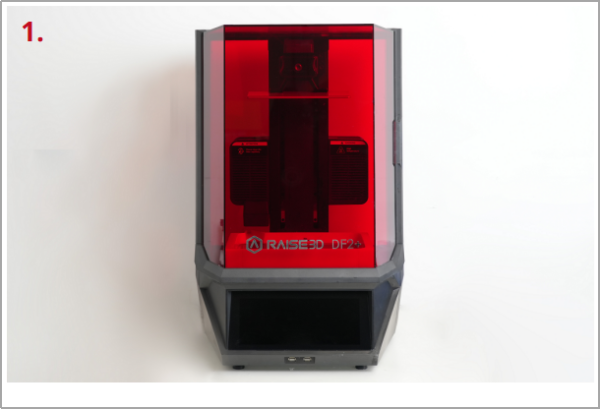
| After unpacking, place the printer on a stable surface and in a well-ventilated area. |
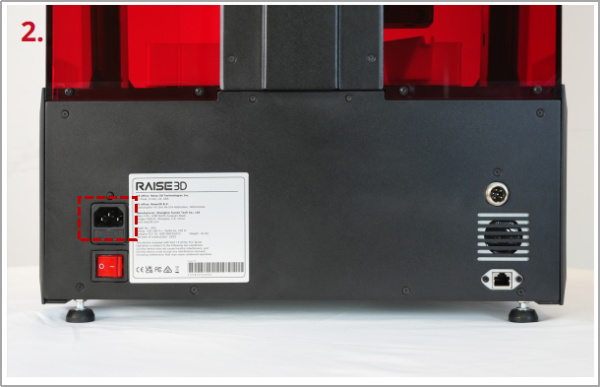
| The printer contains 1 power cord matching the local standard. Please use the power cord that is compliant with your country (region) and plug it into the power socket. |
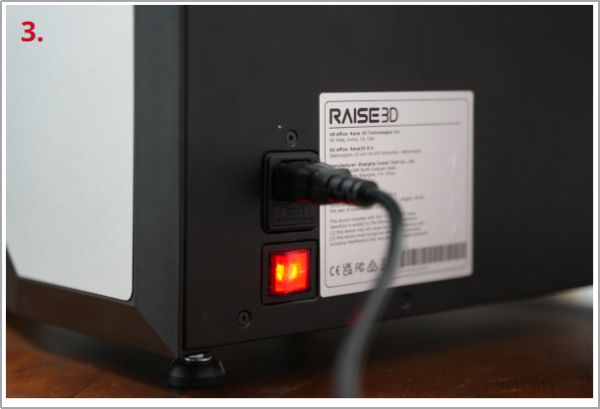
| Use the switch to power on the printer. |