

1. In addition to PA12 CF Support, can the PVA+ be used as a support material for PA12 CF+? Is there a template available for PVA+ to be printed on the E2CF 3D printer?
Yes, PVA+ can also be used as support material, just as the PA12 CF Support. PVA+ is a water-soluble material, so when it’s used as the support material, it can be removed when soaking it in water. However, PA12 CF+ is very hydroscopic and could lose its properties quickly after being soaked in water. Raise3D suggests using PA12 CF Support material when printing PA12 CF+.
For complex and sophisticated geometry with supports that are difficult to remove, PVA+ is a good alternative.
A PVA+ template for the E2CF is already available in ideaMaker, and the material option for PVA+ in RaiseTouch for the E2CF has also been released.
2. Can Pro3 Series printers print with PA2 CF+ filament?
Pro3 Series printers are also able to print with PA12 CF+ filament, but Raise3D doesn’t provide the official templates for the Pro3 Series, as customers can customize their own template for their own use. In addition, PA12 CF+ contains carbon fiber, that quickly wears out brass nozzles, meaning that PA12 CF+ filament is not quite suitable for Pro3 Series printers in standard form. However, there is no additional abrasion and wear-out risk for the printer itself, should a customer need to print using PA12 CF+ on a Pro3 Series printer. However, Raise3D strongly advises using a hardened steel nozzle instead of brass nozzle.
3. Is there any template available for PA12 CF+ to be printed on the Pro3 Series printer? What about a PVA+ template for the Pro3 Series?
Raise3D has not provided official templates for PA12 CF+ and PVA+ for the Pro3 Series yet, but Raise3D always welcomes customers' requests and suggestions. More templates will also be released in the future.
4. As annealing will make the support sticking better to the model and harder to remove, is the correct practice to remove the support structure after annealing if printed with PA12 CF Support?
PA12 CF+ is a special material which works well even after annealing, and annealing with PA12 CF Support still in place prevents the printed part from deformation caused by post-crystallization. Therefore, prints with PA12 CF Support should only have the support removed after annealing.
5. Under what circumstances can PVA+ be used more as the support for PA12 CF+?
Generally, when printing large models, Raise3D advises using PA12 CF Support. PVA+ is more commonly used when there are small structural models with holes, voids or cavities.
6. If the prints are printed with PA12 CF+ and PVA+, should the prints be soaked in water to remove the support before or after annealing?
Raise3D recommends first soaking the prints in water to remove the support, then annealing. Sometimes, when printing small parts, annealing may not be necessary.
7. If the prints are printed with PA12 CF+ and PVA+, will it affect the properties or the accuracy of the prints when soaking in water for longer periods of time?
Since PA12 CF+ contains nylon, which is hygroscopic, when soaking in water for longer periods of time, this may compromise the mechanical properties and dimensional accuracy of the printed part.
8. What is the recommended drying time and the temperature range for drying PA12 CF+?
Raise3D recommends using a 1-2kw drying or heating oven, set at 70-80°C for a period of about 12h. The exact settings depend on the power rating of your oven.
Raise3D also suggests putting the material inside the drying box during the printing process to ensure consistency in printing performance and to keep the PA12 CF+ dry before, during and after printing.
9. If PA12 CF+ is dried at a higher temperature, will it make a difference? What is the maximum temperature for drying?
The highest temperature during drying should not exceed 85-90°C, which is close to the softening temperature of PA12 CF+. Raise3D recommends setting a suitable drying temperature so as not to affect the printed model.
10. What is a proper annealing temperature and time after printing when printing with PA12 CF+?
The annealing temperature and time can also vary depending on the power of the oven and the size of printed part:
-For a small size model (side length < 50 mm), annealing at 80°C for 8 hours is recommended;
-For a medium-size model (50 mm < side length < 150 mm), annealing at 80°C for 12 hours is recommended;
-For a large size model, 100°C for at least 12 hours is recommended.
11. What is the recommended layer height when printing with PA12 CF+? What if I print with a 0.6mm or 0.8mm nozzle?
The different layer heights to be printed depend on the nozzle diameter. The default nozzle diameter is 0.4mm, and the recommended printing layer height is 0.15-0.25mm.
Raise3D will release more templates with different layer heights and nozzles in the future.
Please check the following table of templates with different layer heights and nozzles for PA12CF+:
Nozzle Diameter(mm) | Layer Height for Speed (mm) | Layer Height for Standard (mm) | Layer Height for High Quality (mm) |
0.4 | 0.25 | 0.2 | 0.15 |
0.6 | 0.35 | 0.3 | 0.2 |
0.8 | 0.5 | 0.4 | 0.3 |
12. Will the latest ideaMaker versions for the PA12 CF+ be available to all users, no matter what operating systems they use?
Yes, the latest ideaMaker versions for the PA12 CF+ are available to users of Windows, Linux, and Mac OS (Apple silicon chips are also supported).
Customers can visit Raise3D’s official website: https://www.raise3d.com/download/ for more information regarding ideaMaker versions available for download.
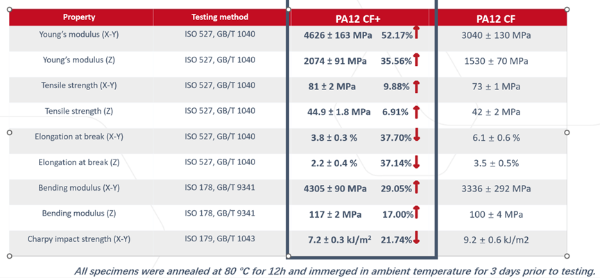
13. Is there any comparison data for PA12 CF+? Will further data become available?
Currently, Raise3D can provide TDS for comparison. Customers can download them from our website: https://s1.raise3d.com/2023/01/Raise3D-Industrial-PA12-CF_TDS_V2.pdf
Raise3D will release more information in the future.
Please check the following table or contact Raise3D for more information.
-END-
