

1. Hyper Speed Level Display Rules
In ideaMaker V.5.2 and above versions, open the Prepare to Slice panel. Any printer with a lightning label  listed in the Printer (
 ) drop-down menu is a Hyper Speed printer that supports Hyper Speed printing mode.
After selecting a Hyper Speed printer, the selected printing template in the Template ( ) drop-down menu will show a label of L1
  , L2
, L2  , L3
, L3  , or Lightning
 . This represents the corresponding Hyper Speed level applied to the selected printing template, as shown in the following figures.
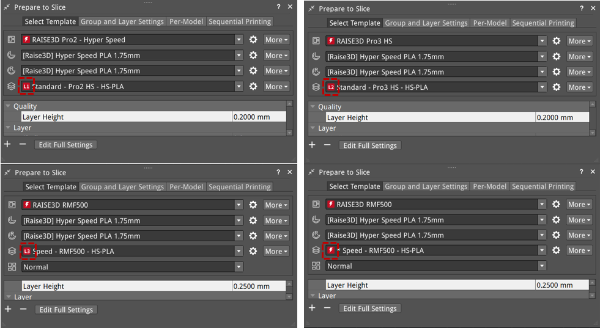
The Hyper Speed level is displayed by different levels corresponding to different ranges of volumetric speed values.
The formula for calculating the volumetric speed is as below:
Volumetric Speed (mm3/s) = Max (Inner Shell Speed * Layer Height * Extrusion Width, Outer Shell Speed * Layer Height * Extrusion Width, Infill Speed * Layer Height * Extrusion Width * Combine Infill Layers)
That is, the maximum value of the product of the above three is taken as the volumetric speed.
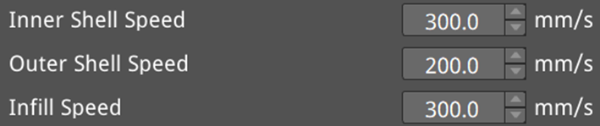
Therefore, the volumetric speed is determined by the Layer Height, Extrusion Width, Inner/Outer Shell Speed, Infill Speed and Combine Infill Layers. In the Advanced Settings panel, these parameter settings are shown as the following figures.



The corresponding relationship between the Hyper Speed level and the volumetric speed value range is shown in the following table:
The Volumetric Speed Value x (mm3/s) | x<=7.5 | 7.5<x<=15 | 15<x<=25 | 25<x<=50 | X>50 |
Hyper Speed Level | Do not display | L1 | L2 | L3 | Display the lightning label |
When volumetric speed value x is smaller than or equal to 7.5 mm3/s, the Hyper Speed level will not be displayed; When the volumetric speed value x is bigger than 7.5 and smaller than or equal to 15 mm3/s, the Hyper Speed level will be L1, displaying  ; When the volumetric speed value x is bigger than 15 and smaller than or equal to 25 mm3/s, the Hyper Speed level will be L2, displaying
  ; When the volumetric speed value x is bigger than 25 and smaller than or equal to 50 mm3/s, the Hyper Speed level will be L3, displaying
  ; When the volumetric speed value x is bigger than 50 mm3/s, the Hyper Speed level will display the lightning icon
  .
.
2. Warning Threshold
In Hyper Speed mode, there are threshold limits for the Inner/Outer Shell Speed, Infill Speed, and Combine Infill Layers. If any exceeds the threshold, the user will be notified in ideaMaker.
In the Advanced Settings panel, a yellow exclamation mark will notify when any of these items exceeds the threshold, and an explanation will be given when the mouse hovers over it, as shown in the example below.
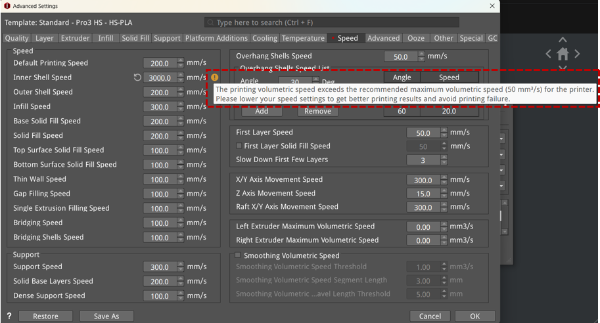
Determine the warning threshold based on the volumetric speed corresponding to the Hyper Speed level of currently used printer and filament. The warning threshold formula is as below:
Warning Threshold = Min (the volumetric speed corresponding to the Hyper Speed level of the current printer, the volumetric speed corresponding to the Hyper Speed level of the current filament)
That is, the minimum value of the two volumetric speed values is taken as the warning threshold.
For examples:
① The user uses the printer model Pro3 HS with the Hyper Speed level as L3, and the filament of Premium PLA template with the Hyper Speed level as L2. The corresponding volumetric speed threshold is 50 mm3/s for L3 and 25 mm3/s for L2. Since the warning threshold should use the smaller value 25 mm3/s between the two volumetric speed thresholds, when the volumetric speed of the Premium PLA template exceeds the volumetric speed threshold 25mm3/s, the user will be warned.
② The user uses the printer model Pro2 – Hyper Speed with the Hyper Speed level as L1, and the filament of Premium PLA template with the Hyper Speed level as L2. The corresponding volumetric speed threshold is 15 mm3/s for L1 and 25 mm3/s for L2. Since the warning threshold should use the smaller value 15 mm3/s between the two volumetric speed thresholds, when the volumetric speed of the Premium PLA template exceeds the volumetric speed threshold 15mm3/s, the user will be warned.
The Hyper Speed levels and volumetric speed thresholds corresponding to the printer models and filaments that support Hyper Speed mode are shown in the table below:
Printer Models | Hyper Speed Level | Corresponding Volumetric Speed Threshold (mm3/s) |
Raise3D Pro2 - Hyper Speed | L1 | 15 |
Raise3D E2/E2CF HS | L1 | 15 |
Raise3D Pro3 - Hyper Speed Kit | L2 | 25 |
Raise3D Pro3 HS | L3 | 50 |
Raise3D RMF500 | L3 | 50 |
Filaments | Hyper Speed Level | Corresponding Volumetric Speed Threshold (mm3/s) |
Hyper Speed | L3 | 50 |
Hyper Core | L3 | 50 |
Premium | L2 | 25 |
Industrial | L2 | 25 |
[25.008-EN.1.0.20250102-ideaMaker-How to Determine the Hyper Speed Level in Hyper Speed Mode for ideaMaker V.5.2 and Above Versions]
-END-
