

I. Standard Mode and Hyper Speed Mode
In the ideaMaker 4.4.0 Alpha version, if Hyper Speed Mode is not enabled, Standard Mode will be used. When Hyper Speed Mode is toggled on, the software will enable the Hyper Speed functionality.
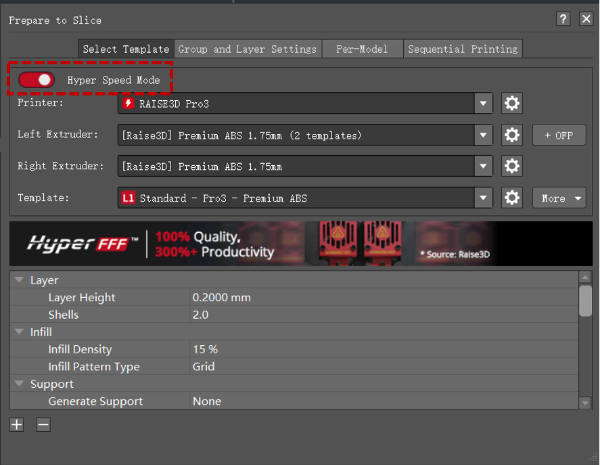
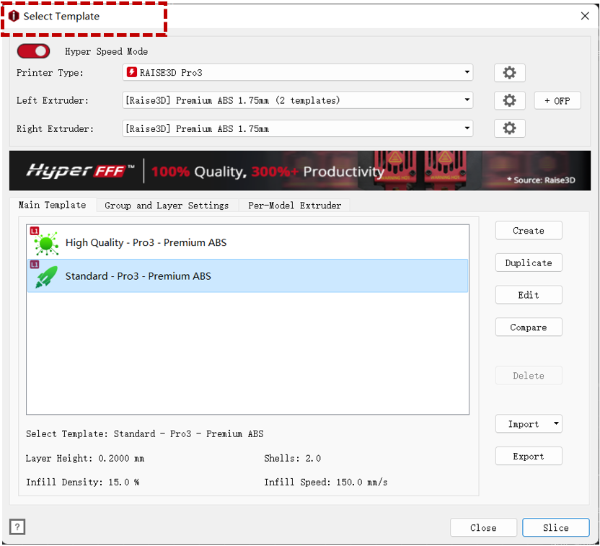
2. In Standard Mode and Hyper Speed Mode, threshold values for each speed of different filaments
In ideaMaker 4.4.0 Alpha version, Raise3D filaments have threshold limits for speed, acceleration, and volumetric flow rate in Standard Mode and Hyper Speed Modes respectively, and for each speed that exceeds the threshold, ideaMaker will display an alert.
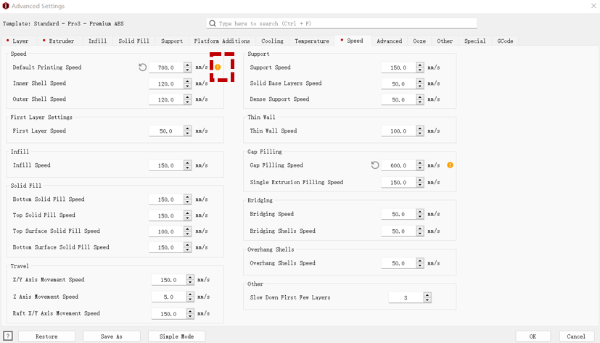
In Standard Mode/Hyper Speed Mode, click "Edit" to enter the advanced settings of the template. A yellow exclamation mark alerts when velocity, acceleration, volumetric flow rate exceeds the threshold, and the explanation will be given when hovering the mouse the exclamation mark.
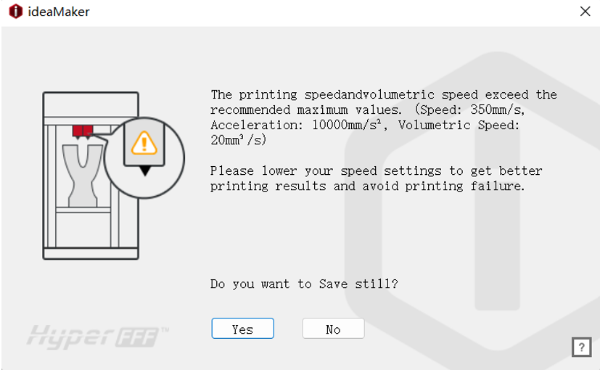
In Standard Mode/Hyper Speed Mode, click “Ok” after adjusting the parameters in the template or click “Slice”. A warning window will pop-up when velocity, acceleration, and volumetric flow rate exceed the threshold.
The thresholds for velocity, acceleration, and volumetric flow rate are different for Raise3D filaments in Standard Mode and Hyper Speed Mode, as shown in the table below.
Standard Mode | Hyper Speed Mode | |||||
Volumetric Speed | Speed | Acceleration | Volumetric Speed | Speed | Acceleration | |
Raise3D Premium Filament | <=10mm3/s | <=100mm/s | <=1500mm/s2 | <=20mm3/s | <=350mm/s | <=10000mm/s2 |
Raise3D Hyper Speed Filament | <=10mm3/s | <=100mm/s | <=1500mm/s2 | <=30mm3/s | <=350mm/s | <=10000mm/s2 |
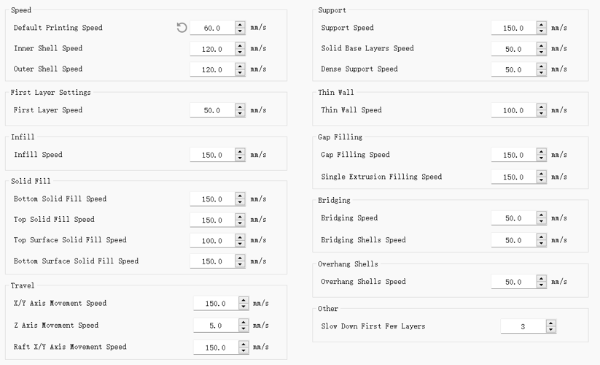
Speed judgment includes all of the following fields:
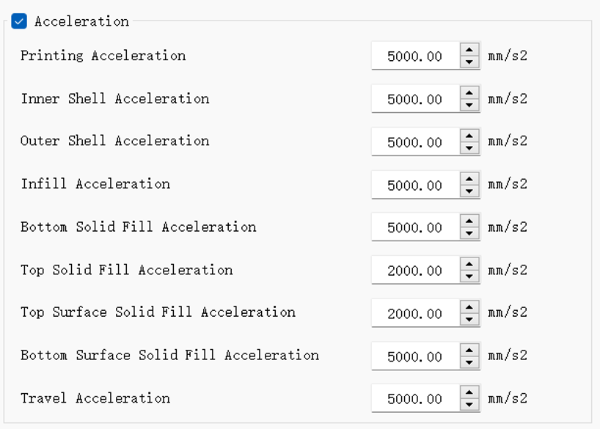
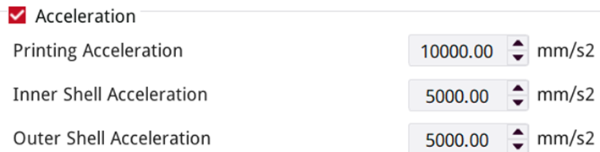
The acceleration judgment includes all of the following fields:
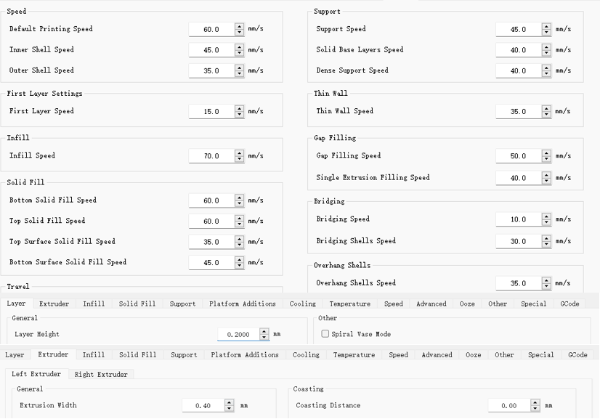
The volumetric flow rate judgment includes all of the following fields:
Volumetric flow rate calculation formula: Volumetric Speed = Layer Height * Extrusion Width * Printing Speed
The volumetric flow rate is determined by the Layer Height, Extrusion Width, and Printing Speed.
In ideaMaker V.5.1.1 and its subsequent versions:
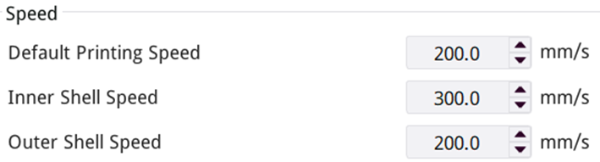
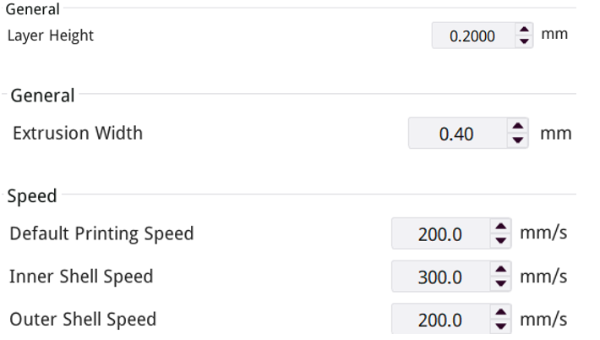
Speed judgment includes all of the following fields: Default Printing Speed, Inner Shell Speed and Outer Shell Speed, as shown in the figure below.
The acceleration judgment includes all of the following fields: Printing Acceleration, Inner Shell Acceleration and Outer Shell Acceleration, as shown in the figure below.
The volumetric flow rate judgment includes all of the following fields:
Volumetric flow rate calculation formula: Volumetric Speed = Layer Height * Extrusion Width * Printing Speed
The volumetric flow rate is determined by the Layer Height, Extrusion Width, and Printing Speed.
3. In Hyper Speed Mode, rules for judging the L1/L2 tag on the template.
In ideaMaker 4.4.0 Alpha version, for the Hyper Speed Mode, the templates are differentiated by tags according to the velocity, acceleration, and volumetric flow rate values of the template.
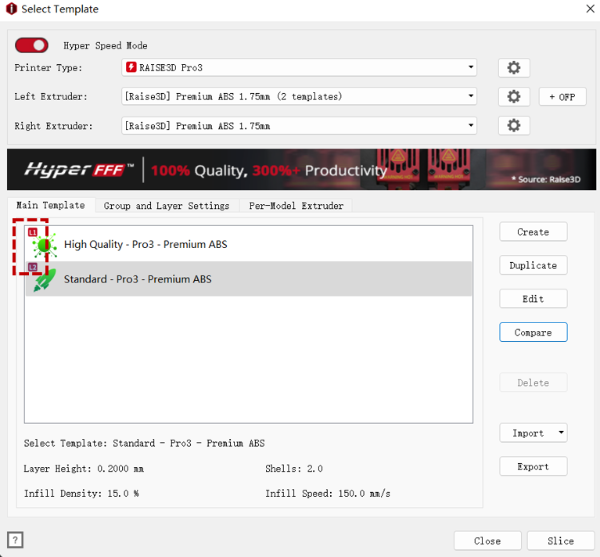
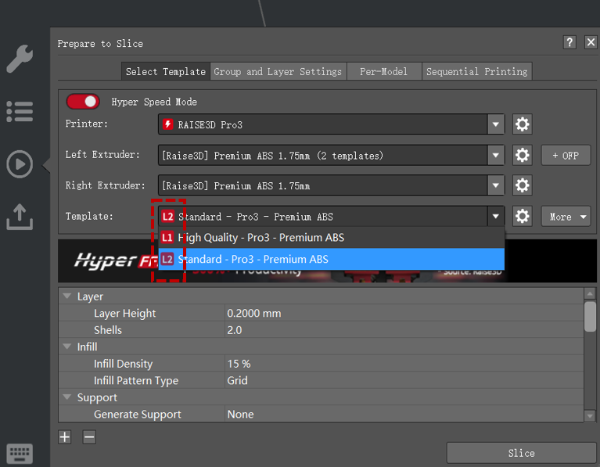
The ideaMaker software will judge all parameters in the templates that affects the velocity, acceleration, and volumetric flow rate of the template. When one of the parameter values reaches L1 or L2, the template will be saved, and a small tag of L1 or L2 will be added to this template as a distinction (in Standard Mode, no labels will be displayed) .
ideaMaker V.4.4.0 Alpha:
Label Display | Speed Range |
Standard Mode (No tag displayed) | Speed < = 100mm/s Acceleration < =1500mm/s2 Volumetric flow rate < =10mm3 /s |
Displaying L1 tags | 100mm/s< speed< =150mm/s 1500mm/s2 < Acceleration < =5000mm/s2 10mm3 /s< volumetric flow rate< =15mm3 /s |
Displaying L2 tags | 150mm/s< speed< =350mm/s 5000mm/s2 < Acceleration < =10, 000mm/s2 15mm3 /s< volumetric flow rate< =30mm3 /s |
ideaMaker V.5.1.1 and its subsequent versions:
Label Display | Speed Range |
Standard Mode (No tag displayed) | Speed <= 100mm/s Acceleration < 2000mm/s2 Volumetric flow rate <= 10mm3/s |
Displaying L1 tags | 100mm/s < speed <= 150mm/s 2000mm/s2 <= acceleration <= 5000mm/s2 10mm3/s < volumetric flow rate <= 15mm3/s |
Displaying L2 tags | 150mm/s < speed <= 350mm/s 5000mm/s2 < acceleration <= 10000mm/s2 15mm3/s < volumetric flow rate <= 30mm3/s |
Note: For the Raise3D Pro2 - Hyper Speed Series printers, its high-speed level is L1, so the speed range of the displayed L2 tags is not applicable.
[25.004-EN.4.0.20241016-ideaMaker-How Does ideaMaker Match Each Level of the Template in Hyper Speed Mode]
-END-
