

[ Manual N2&N2 Plus - How to Replace the Extruder Board - V1.0 ]
1. Turn off the power.
2. Please remove the board cover by unscrewing these two screws (refer to figure 1).
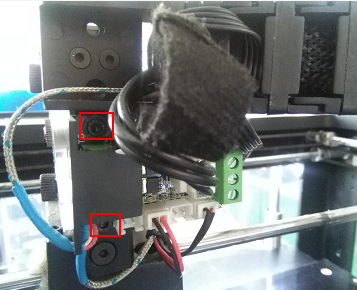
3. Please remove all cables and plugs connected on the Extruder Connection board. Please do it gently or you will break the cables. (Note: Label the heater rods and thermocouplers to ensure they are plugged back into the right terminal blocks later)
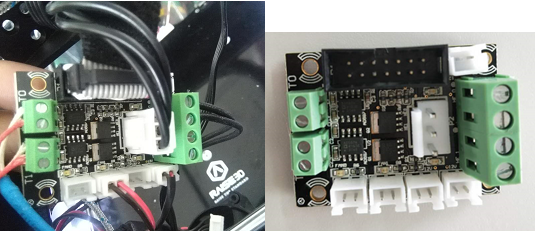
Loosen the screws on the terminal blocks to remove the heater rods and thermocouplers.
In some cases, the ribbon cable may be glued in place. To remove the glue carefully wedge a small flathead screwdriver between the port and the plug.
4. Please reconnect all cables back to the new motion board.
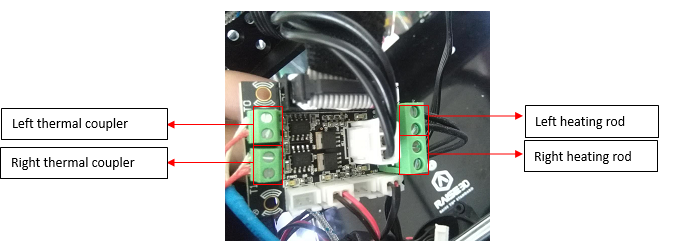
When installing the thermocouplers, ensure the red wire is in the lower socket of each terminal block.
After connecting the thermal coupler on the Extruder board, please pull the red and white cables to see if you can pull them out. If you can pull them out, fully loosen the screws on the terminal block, then reconnect the cables until they are tightly connected in the socket.
When installing the heater rods, insert the two leads of the left heater rod in the two sockets of the top terminal block and the two leads of the right heater rod in the two sockets of the bottom terminal block.
Please check if you can pull them out or not after the connection. If you can pull the cables out, please reconnect them.
For the final step, please reconnect the rest cables to the original sockets tightly and correctly. (Note: On a dual extrusion printer both fans should be plugged into the far-right ports. If you have a dedicated part cooling fan, plug it into either of the left two fan ports. On a dual extrusion printer both fans should be plugged into the far right ports. If you have a dedicated part cooling fan plug it into either of the left two fan ports.
(Note: when you plug in or take out the black head of the wide grey cable, please do it perpendicular to the socket in case you twisted the pins.)
[ Manual N2&N2 Plus - How to Replace the Extruder Board - V1.0 ]
End
