

Tools:
① Needle nose pliers
② 1.5mm hex wrench
③ 2.5mm hex wrench


1. Unload the filament from the extruder where the hot end assembly needs to be replaced. While this tutorial uses the left nozzle as an example.
1)Click "Utilities" on the screen to enter the printer control page.

Figure 1 Enter the "Utilities" page.
2)Set the temperature of the left nozzle to the proper unloading temperature. For example, the Raise3D Premium PLA filament is loaded in the left nozzle and its default loading temperature is 215℃. In our demonstration, we set the left nozzle temperature to 215℃.

Figure 2 Set the temperature of the left nozzle.
3)Click the "Unload" button, and the printer will automatically begin to heat. When the printer reaches the targeted temperature, click "Load". The extruder will pre-extrude the remaining filament in the extruder and begin to unload the filament.

Figure 3 Unload the filament.
4)Press and hold the metal quick connector on the extruder with your hand and pull the filament guide tube out of the extruder.

Figure 4 Pull out the filament guide tube.
5)Gently pull the filaments out of the extruder. When all the filament is removed from the extruder, click "OK" on the screen to end the unloading.

Figure 5 Pull out the filament.
1. Select the left nozzle icon on the home page, set the temperature of the left nozzle to 180℃, and heat the left nozzle.

Figure 6 Heating the left nozzle.
2. Power off the printer.
Note: Do not operate the printer with power on to avoid damage to the printer and personal injury.

Figure 7 Power off the printer.
3. Observe whether the heating block and nozzle are stained with remaining filaments. If so, clean the filaments with tweezers or a screwdriver.
4. Open the red buckle on the left interchangeable hot end up to 90°. Hold the black handle and remove the hot end horizontally.


Figure 8 Remove the left quick release hot end.
5. Use a 2.5mm hex wrench to loosen the 4 screws on the fan, then remove the fan for further operation.

Figure 9 Remove the screws on the fan.
6. Use a 1.5mm hex wrench to loosen the 2 screws securing the hot end assembly.

Figure 10 Loosen the 2 screws securing the hot end.
7. Press and hold the buckle to remove the heating rod wire and the thermocouple wire behind the hot end.
Note: At this time, the heating block and nozzle are still hot, please be careful of burns.
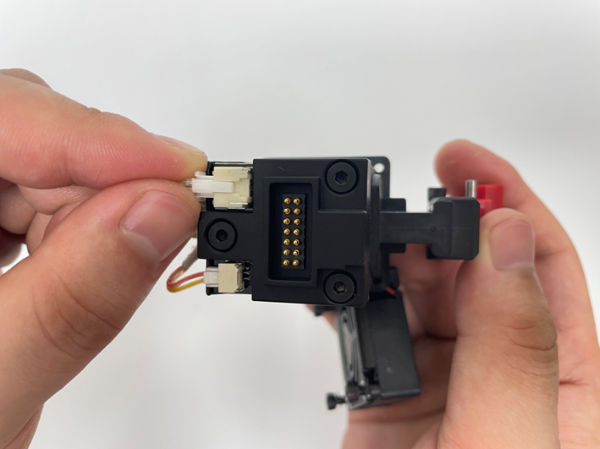
Figure 11 Remove the thermocouple wire and heating rod wire.
8. Carefully maneuver needle nose pliers to securely clasp the heating block, and carefully extract the hot end assembly in a motion that does not bend the throat tube component. It is crucial that the extraction motion is as parallel as possible to the interchangeable hotend, as exampled below.

Figure 12 Extract the hot end assembly.
1. Prepare a new hot end assembly.
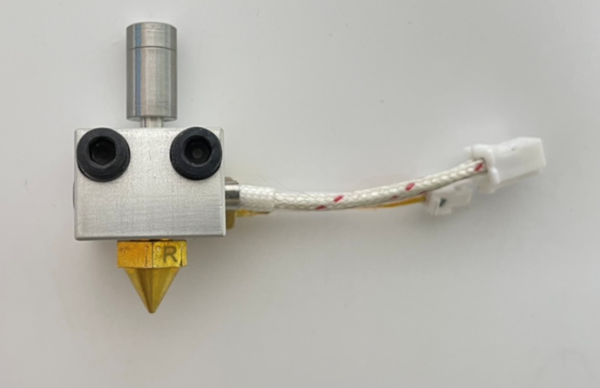
Figure 13 Prepare a new hot end assembly.
2. Tighten the throat to prevent material leakage during printing.

Figure 14 Tighten the throat.
3. Plug the heating rod wire and the thermocouple wire back into their original positions.
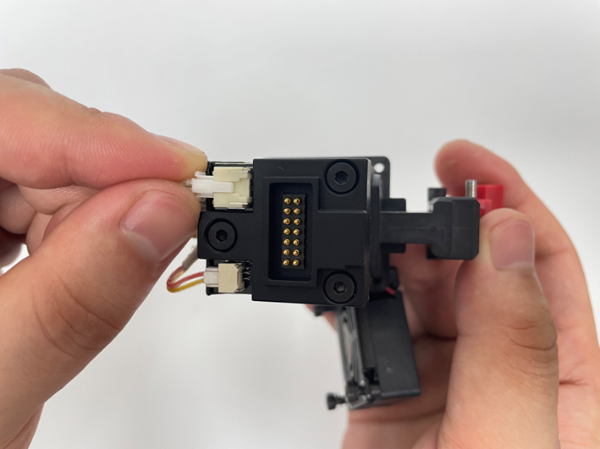
Figure 15 Insert the heating rod wire and the thermocouple wire back.
4. Hold the hot end assembly with your hand and insert the hot-end assembly into its original position, so that it does not slide down. Keep the heating block in a horizontal position.
Note: Be sure to insert the throat tube to the end, otherwise it will cause material leakage during the printing process.

Figure 16 Insert the hot end assembly into its original position.
5. Use a 1.5mm hex wrench to tighten the screws securing the hot end assembly. At this time, be sure to use your hands to hold the heating block hard, otherwise the heating block will not be installed in place, resulting in material leakage during the printing process.

Figure 17 Tighten the screws securing the hot end assembly.
6. Use a 2.5mm hex wrench to install the 4 screws that secure the fan.
Note: When installing the fan, the connecting wire of the fan needs to be stuck in the slot to avoid short circuit caused by squeezing the fan wire.

Figure 18 Note the slot.
7. Align the hot end with the groove on the extruder. Insert the hot end horizontally until the pin on the red tab aligns with the one on the extruder. Press down on the red buckle to secure the hot end in place.


Figure 19 Install the interchangeable hot end.
1. Make sure your printer has loaded 2 spools of Raise3D Premium PLA filament and can extrude the filament normally.
2. Run a 5-step offset calibration to calibrate the nozzle height and offset. Check if the printer can print normally.
1) Select the "Settings" icon in the upper left corner to enter the settings interface. Then go to "Machine" > "Maintenance" > "Offset Calibration".


Figure 20 Enter the Offset Calibration.
3. Make sure the printer meets all the requirements on the screen, and then click "Start". You will enter the 5-step Offset Calibration interface, run each step in turn.


Figure 21 Run the 5-step Offset Calibration.
4. Check whether there is filament leaking during printing. If the nozzle leaks, reinstall the hot end assembly following the steps in this tutorial or contact Raise3D after-sales support.
