

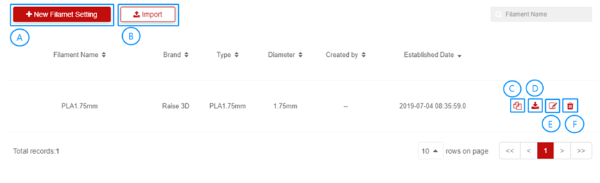
1.Click +New Filament Setting button;
2.Set data;
3.Click Save.
1.Click  button;
2.Choose filament file;
3.Click Confirm.
1. Click  Copy button;
2. Modify data;
3. Click Confirm.
Click  Export button
5.Edit Filament Setting - [E]
1.Click  Edit button;
2.Modify data;
3.Click Confirm.
1.Choose filament setting which you want to Delete, then click  ;
;
2.Click Confirm.
Tip: User can’t Delete filament setting when he / she is not creator.
