

The “Tube” tab displays the printer's motion parameters.
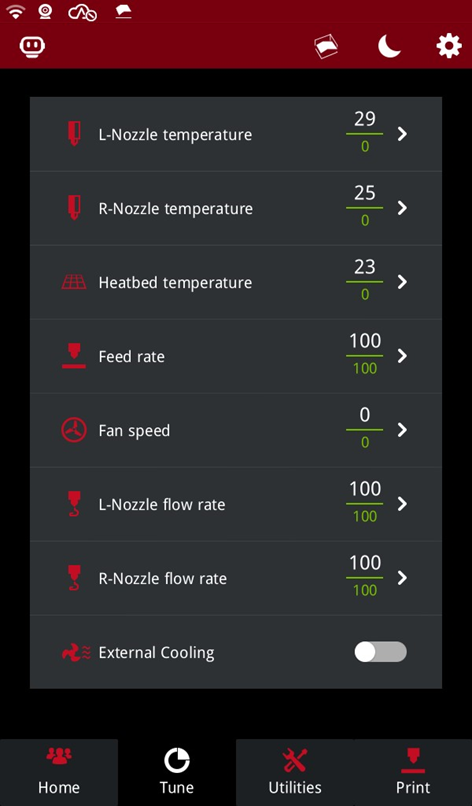
L-Nozzle temperature: The current temperature of the left nozzle is displayed above. Tap the right arrow to set the target temperature below.
R-Nozzle temperature: The current temperature of the right nozzle is displayed above. Tap the right arrow to set the target temperature below.
Note: If the nozzle temperature is displayed in gray, it means the hotend is removed or not installed properly. 
Heatbed temperature: The current temperature of the heat bed is displayed above. Tap the right arrow to set the target temperature below.
Feed rate: The current print speed is displayed above. Tap the right arrow to set the target speed below.
Note: If your model slice file has set a print speed, the printer will automatically read the set value from the file and display it as the target speed.
Fan speed: The current fan speed is displayed above. Tap the right arrow to set the target speed below.
L-Nozzle flow rate: The current flow rate of the left nozzle is displayed above. Tap the right arrow to set the target flow rate below.
R-Nozzle flow rate: The current flow rate of the right nozzle is displayed above. Tap the right arrow to set the target flow rate below.
External Cooling: Turns the cooling fan on or off.
