


Figure 1: Home in Standard Mode.
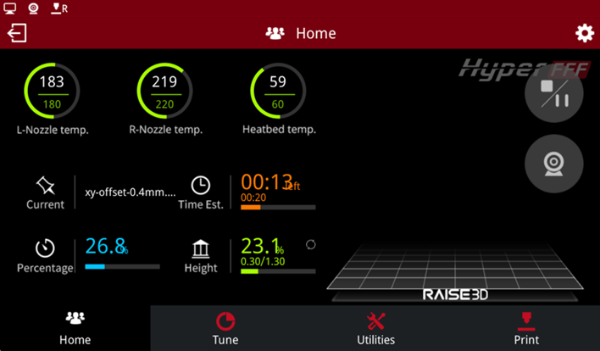
Figure 2: Home in Hyper Speed Mode.
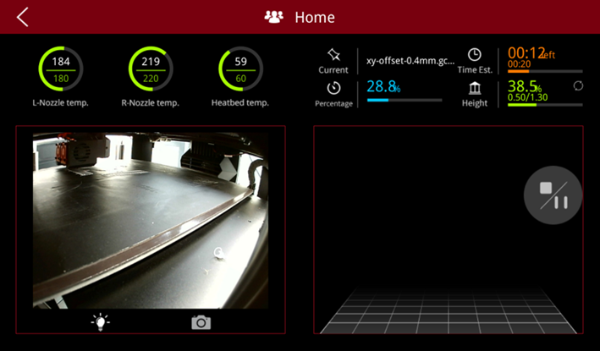
Figure 3: Camera monitoring for the printer.
L-Nozzle temp.: The temperature of the left nozzle. Upper value is current temperature. The lower value is target temperature.
R-Nozzle temp.: The temperature of the right nozzle. Upper value is current temperature. The lower value is target temperature.
Heatbed temp.: The temperature of the heating bed. Upper value is current temperature. The lower value is target temperature.
Current: The name of the printing model.
Time Est.: The total time and the remaining time of the printing model. The bigger digits refer to the remaining time. The smaller digits shown below refer to the total time in Figure 3. Click the remaining time, it will show the completion time.
Percentage: the percentage of the model that has been completed so far.
Height: The height of the completed model. Click the values to check the layer information, the current layer and total number of layers.
 : Pause or stop printing task.
 : View current printing status in real-time.
 : If there is an LED light installed inside the printing chamber, clicking this icon will light up the LED light.
 : Press the camera button to take photos for current printing status, and save them to your local disk.
Note: If there is no filament in the filament run-out sensor, it will display “The current task has been paused by filament monitor”.
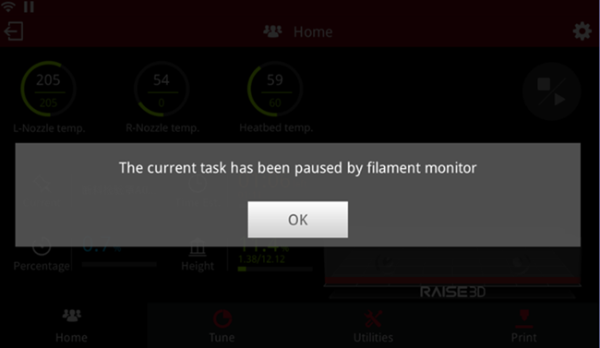
Figure 4: The current task has been paused by filament monitor.
Status Bar:
 : WIFI connection status.
 : Ethernet connection status.
 : Incognito icon, which will be shown only when the incognito mode is enabled.
 : Camera icon, which will be shown only when the camera is enabled.
 : Printing status icon, which will be shown only when printing starts.
 : Exit remote connection.
 : Settings icon, enter settings interface and you will see more settings, such as printer type, serial number and so on.
