

 : When you enable this button, the model can be rotated to another angle by holding the left button and dragging the circle with your mouse. Also set the exact angle value to rotate the model in the operation property zone, which is based on the aircraft principal axes. The Roll refers to longitudinal axis. Pitch refers to lateral axis. Yaw refers to vertical axis.
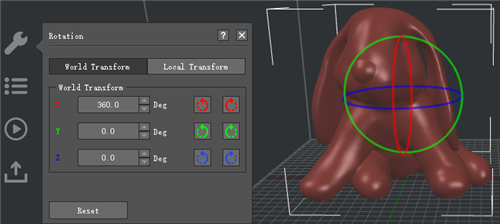
Figure 1: You can use the color rings around the model or modify the left values to rotate the model. [Clicking arrows to the right of the values will rotate the model by 90 degrees clockwise/counter-clockwise]
-END-
