

In this page you can also enable the function of Adaptive Layer Height.
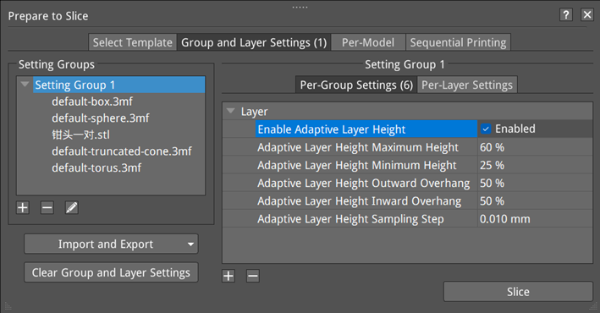
Figure 1: Enable Adaptive Layer Height.
Enable Adaptive Layer Height: With this function enabled, ideaMaker will automatically set different layer height values for different structures, smaller layer height for details and larger layer height for non-detailed structures, which can help save the printing time without affecting printing accuracy.
Adaptive Layer Height Maximum Height: Refers to the maximum adaptive layer height.
It is expressed by the percentage of the extrusion width.
Adaptive Layer Height Minimum Height: Refers to the minimum adaptive layer height.
It is expressed by the percentage of the extrusion width.
For example, extrusion width is 0.4mm, set Adaptive Layer Height Maximum Height to 100% and Adaptive Layer Height Minimum Height to 25%. That means the maximum allowed layer height is 0.4mm, and minimum allowed layer height is 0.1mm. ideaMaker will figure out each structure’s layer height between 0.1mm and 0.4mm based on your model. The preview after slicing is shown in the following Figure 2.
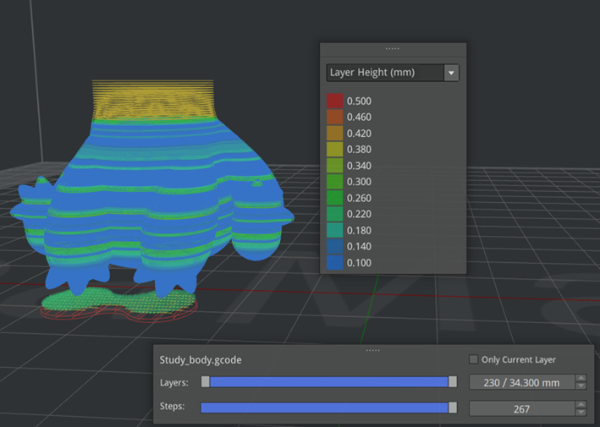
Figure 2: An example of Adaptive Layer Height.
Adaptive Layer Height Outward Overhang: Refers to the overhang between two successive layers when the model sides slope outwards. It is expressed as a percentage of the extrusion width.
Adaptive Layer Height Inward Overhang: Refers to the overhang between two successive layers when the model sides slope inwards. It is expressed as a percentage of the extrusion width.
For example, extrusion width is 0.4mm, set Adaptive Layer Height Outward Overhang to 50%, and Adaptive Layer Height Inward Overhang to 50%. That means the adaptive layer’s outward step is 0.2mm and the adaptive layer’s inward step is 0.2mm.
Adaptive Layer Height Sampling Step: Refers to the sampling step when ideaMaker is choosing the layer height between the minimum layer height and maximum height.
Note: Before slicing, please make sure the function of Adaptive Layer Height is enabled as shown in Figure 1.
