

(1) Speed
Default Printing Speed: The speed for printing non-specified areas.
Inner Shell Speed: The speed for printing the inner shell of the model.
Outer Shell Speed: The speed for printing the outer shell of the model.

Figure 1: Only the single shell located at the outermost edge is the outer shell. All remaining shells are inner shells.
Infill Speed: The printing speed for the model’s infill structure.
Base Solid Fill Speed: The printing speed for the solid bottom layers.
Solid Fill Speed: The printing speed for the solid layers.
Top Surface Solid Fill Speed: The printing speed for solid top surface layers.
Bottom Surface Solid Fill Speed: The printing speed for solid bottom surface layers.
Thin Wall Speed: The printing speed for the thin wall structure.
Gap Filling Speed: The printing speed for the gap filling.
Single Extrusion Filling Speed: The speed for filling small gaps with single extrusions.
Bridging Speed: The printing speed for the bridging parts.
Bridging Shells Speed: The printing speed for the shells in the bridging parts
(2) Support
Support Speed: The printing speed for the support structure.
Solid Base Layers Speed: The printing speed for the solid base layer.
Dense Support Speed: The printing speed for the dense support structure.
(3) Overhang Shells
Overhang Shells Speed: The printing speed for the overhang shells’ structure.
Overhang Shells Speed List: Click Add to set the printing speed for the overhang shells at a specific angle. Delete the value by selecting the value and clicking Remove.
Angle: The angle for the overhang shells.
Speed: The printing speed for the overhang shells.
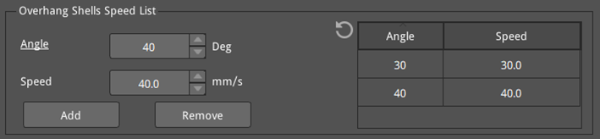
Figure 2: The Overhang Shells Speed List.
(4) First Layer Speed: The printing speed for the model’s first layer.
First Layer Solid Fill Speed: With this function enabled, changing the printing speed for the solid part of the model at the first layer is allowed.
Slow Down First Few Layers: Slows down the printing speed during the first few layers, starting from the second layer, except during the printing of the Raft. This option can improve adhesion and printing quality. If you set the value to 3 layers, the speed from layer 2 to layer 4 will be slower than the specified speed. (The first layer will not be affected by this option.)
(5) X/Y Axis Movement Speed: The speed at which the nozzle moves from one place to another when not printing in X-axis and Y-axis directions.
Z Axis Movement Speed: The speed at which the build plate moves when not printing in the Z-axis direction.
Raft X/Y Axis Movement Speed: The speed at which the nozzle moves from one place to another during the Raft printing process when not printing in the X-axis or Y-axis direction.
(6) Left Extruder Maximum Volumetric Speed: Set the maximum volumetric flow rate of material extruded per second for the left extruder. If the volumetric flow rate exceeds this threshold, the printing speed will decrease.
Right Extruder Maximum Volumetric Speed: Set the maximum volumetric flow rate of material extruded per second for the right extruder. If the volumetric flow rate exceeds this threshold, the printing speed will decrease.
(7) Smoothing Volumetric Speed: With this function enabled, smooth transition printing will be used for the sudden changes in flow rate between two segments, and the unit is mm3/second.
Smoothing Volumetric Speed Threshold: When the volumetric speed between two consecutive segments exceeds this threshold value, a smooth volumetric speed will be used for printing.
Smoothing Volumetric Speed Segment Length: The segment length when printing models with smooth volumetric speed.
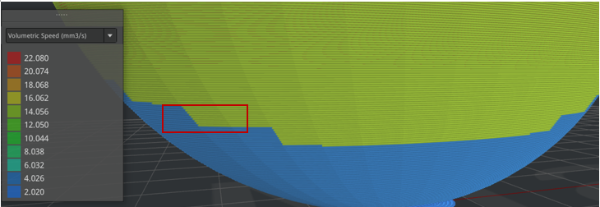
Figure 3: With Smoothing Volumetric Speed disabled, the volumetric speed in blue suddenly changes to the volumetric speed in yellow.
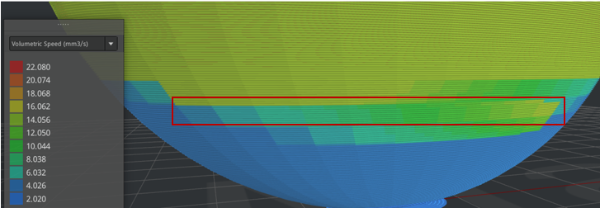
Figure 4: With Smoothing Volumetric Speed enabled (the Smoothing Volumetric Speed Segment Length is 3mm),the volumetric speed in blue transitions smoothly to the volumetric speed in yellow.
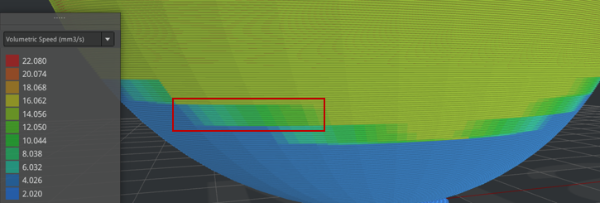
Figure 5: With Smoothing Volumetric Speed enabled (the Smoothing Volumetric Speed Segment Length is 1mm),the volumetric speed in blue transitions smoothly to the volumetric speed in yellow.
Smoothing Volumetric Speed Segment Length Threshold: When the printed segment length is shorter than this value, the Smoothing Volumetric Speed will not be applied.
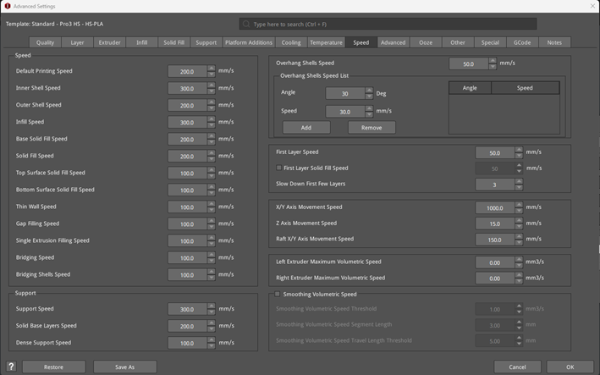
Figure 6: The Speed tab.
