

(1) Acceleration
Acceleration: The rate of change of velocity of an object with respect to time.
Printing Acceleration: The printing acceleration speed for the non-specified area of the model.
Inner Shell Acceleration: The printing acceleration speed for the inner shell of the model.
Outer Shell Acceleration: The printing acceleration speed for the outer shell of the model.
Infill Acceleration: The printing acceleration speed for the infill structure of the model.
Base Solid Fill Acceleration: The printing acceleration speed for the bottom solid fill structure of the model.
Solid Fill Acceleration: The printing acceleration speed for the solid fill structure of the model.
Top Surface Solid Fill Acceleration: The printing acceleration speed for the top surface solid fill structure of the model.
Bottom Surface Solid Fill Acceleration: The printing acceleration speed for the bottom surface solid fill structure of the model.
Support Acceleration: The printing acceleration speed for the support structure of the model.
First Layer Acceleration: The printing acceleration speed for the first layer of the model.
Travel Acceleration: The printing acceleration speed at which the nozzle moves from one place to another when not printing in X-axis and Y-axis directions.
(2) Override Material Settings (Left/Right Extruder)
With this function enabled, you can edit the material flowrate for the left and right extruder. If you set the flowrate to 95% in Material Settings, but you enable this function and set it to 90%, the flowrate will change to 90%.
Note: When the Override Material Settings function is enabled, the flowrate settings under this function take precedence over the flowrate in the Material Settings panel. Therefore, the final slice will use the flowrate set in the Override Filament Settings.
Left Material Flowrate: The flow rate of the filament used by the left extruder.
Right Material Flowrate: The flow rate of the filament used by the right extruder.
(3) Jerk
Jerk: The maximum instantaneous velocity change.
Printing Jerk: The maximum instantaneous velocity change for printing the model’s non-specified area.
Inner Shell Jerk: The maximum instantaneous velocity change for printing the model’s inner shell.
Outer Shell Jerk: The maximum instantaneous velocity change for printing the model’s outer shell.
Infill Jerk: The maximum instantaneous velocity change for printing the model’s infill structure.
Base Solid Fill Jerk: The maximum instantaneous velocity change for printing the first few layers of the solid part touching the platform or raft.
Solid Fill Jerk: The maximum instantaneous velocity change for printing the solid part of the model.
Top Surface Solid Fill Jerk: The maximum instantaneous velocity change for printing the model’s top surface solid fill structure.
Bottom Surface Solid Fill Jerk: The maximum instantaneous velocity change for printing the model’s bottom surface solid fill structure.
Support Jerk: The maximum instantaneous velocity change for printing the model’s support structure.
First Layer Jerk: The maximum instantaneous velocity change for printing the model’s first layer.
Travel Jerk: The maximum instantaneous velocity change when the nozzle moves from one place to another when not printing in X-axis and Y-axis directions.
Jerk Settings support for Delta printers: With this function enabled, ideaMaker will output M205 XYZ command to control the jerk value of Delta Printers.
Notes:
1. This function is disabled by default.
2. This function only works for Delta Printers. For other printers, ideaMaker will still output the M205 XY command to control the jerk value.
(4) Pressure Advance (Left/Right Extruder)
Pressure Advance: The advance time of the left/right nozzle’s extrusion to reduce material leakage. Its unit is seconds.
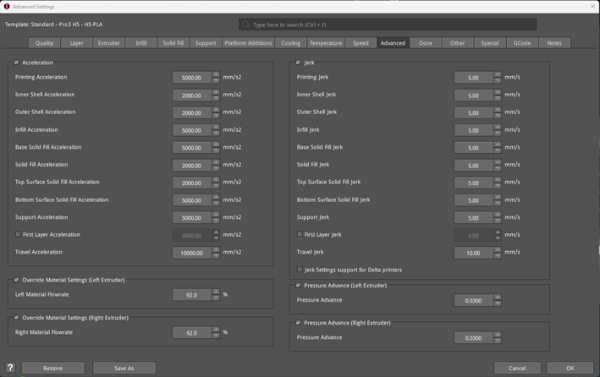
Figure 1: The Advanced tab.
