

(1) Temperature
Heated Bed Temperature: The temperature of heating bed when printing.
Primary Extruder: The temperature of the primary extruder during printing. The left extruder is set as the primary extruder by default when you set Extruder Count to 1 in the Printer Settings panel.
Left Extruder: The manually controlled temperature of the left extruder.
Right Extruder: The manually controlled temperature of the right extruder.
The Left Extruder and Right Extruder settings can only be displayed after setting the Extruder Count to 2 in the Printer Settings panel.
Use Temperature Control List: With this function enabled, you can set different temperature values for specific layers’ heating bed, left extruder and right extruder. You can add a temperature for a specified layer by clicking the Add Temperature button and inputting the temperature value in the right box after you have set the Layer value. You can delete the temperature by selecting the value in the right box and clicking the Remove Temperature button.
(2) Cool Down Inactive Extruder
Cool Down Inactive Extruder: With this function enabled, the inactive extruder will be cooled down during printing.
Move to Park Position: With this function enabled, the inactive extruder will move to a specific position to heat up the extruder.
Note: Please disable this function if you use the Raise3D E2, E2CF and RMF500 printer, which has the Independent Dual Extrusion feature, and nozzles will go back to the home position automatically when switching extruders.
Park Position X: The park position in the X-axis direction for heating up the inactive extruder before it is switched to active.
Park Position Y: The park position in the Y-axis direction for heating up the inactive extruder before it is switched to active.
Inactive Cooling Temperature (Left): Cools down the inactive left extruder to the target temperature.
Inactive Cooling Temperature (Right): Cools down the inactive right extruder to the target temperature.
Heat up Inactive Extruder in Advance: With this function enabled, the inactive extruder will be heated up before moving to the park position.
Heat up Ahead of Time: The inactive extruder will start to heat up seconds ahead of time before moving to the park position.
Inactive Heating Temperature (Left): The inactive left extruder will be heated up to the target temperature before moving to the park position.
Inactive Heating Temperature (Right): The inactive right extruder will be heated up to the target temperature before moving to the park position.
Cool Down before Extruder Switch: Cools down the active extruder before switching extruders.
Note: For E2, E2CF and RMF500 printers, this function can be enabled. For Pro2 Series and Pro3 (HS) Series printers, this function must be disabled to protect the switching system.
(3) Decrease Raft Surface and Model First Layer Temp.: If a certain temperature value is set for this function, when Raft is enabled, the temperature of the top layer of the Raft and the first layer of the model in contact with the raft will be simultaneously reduced according to the set value, so as to make it easier to peel off the printed model from Raft. This function does not affect the temperature of any other structure except the first layer of the model, such as the temperature of the support. If the first layer of the model does not come into contact with the Raft, this function will not take effect.
(4) Bottom Surface Temperature: With this function enabled, the temperature of the model’s bottom surface solid fill will be used. Note: This option only works if Bottom Surface Solid Fill Layers is not 0.
Bottom Surface Temperature: Set the printing temperature at the model’s bottom surface solid fill regions. This temperature will not change the temperature of other features, such as inner and outer shells.
Bottom Surface Temperature Area Threshold: If area of the bottom surface solid fill regions is smaller than the threshold value, ideaMaker will not change the temperature at the bottom surfaces; If the area of the bottom surface solid fill regions is equal to or bigger than the threshold value, ideaMaker will use the specified Bottom Surface Temperature.
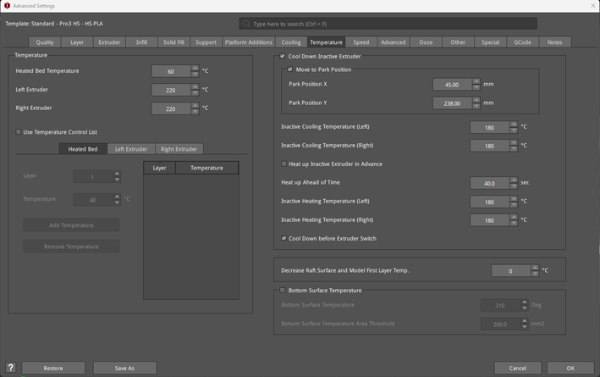
Figure 1: The Temperature tab.
