

Other Settings:
Step-E per MM: The steps required to extrude 1mm filament.
Note: Set Step-E per MM to 0, the command of M92 will not be added into the sliced GCode files, and it will be set to the MCB firmware default value during printing.
X-axis Compensation: The model size compensation on the X-axis. For example, the model’s design size is 100mm, and the X-axis compensation is set to 110%, the printed model’s measured size is 100x110%=110mm on the X-axis.
Y-axis Compensation: The model size compensation on the Y-axis. For example, the model’s design size is 100mm, and the Y-axis compensation is set to 98%, the printed model’s measured size is 100x98%=98mm on the Y-axis.
Note: Dimensional deviation may be caused by filament flowrate, mechanical deviation (such as belt tension) and so on. This function only works for X/Y-axis mechanical deviation.
Baud Rate: This sets the rate at which information is transferred on a communication channel, which defines how fast the communication between a computer and a 3D printer is, in order to transfer the GCode data for printing.
Change GCode E Length by multiplying material flowrate: With this function enabled, the total flowrate will not be controlled by Command M221 anymore but always kept at 100%. The E value in the GCode file will be edited directly, so that the motion controller board doesn’t need to calculate flowrate.
Independent Dual Extrusion: With this function enabled, ideaMaker will allow printing with Duplication or Mirror mode.
Note: The printer should have at least two extruders for this feature. For Raise3D printers, only the E2, E2CF and RMF500 printers can have this function enabled.
Confirm Using Raft if Size is more than: With this function enabled, ideaMaker will automatically measure the model’s width and depth, and print with a raft if the model’s size is bigger than the set value. The default value is 150mm.
Confirm Using Raft if Print Mode is Duplication or Mirror: With this function enabled, ideaMaker will automatically print Raft when the duplication or mirror mode is selected.
Wait for Heating at Extruder Switch: With this function enabled, the system will wait for the extruder to be heated to the target temperature before switching extruders. Note: This function is required to be checked for the Raise3D E2, E2CF and RMF500 printers, otherwise it will report errors during dual-extrusion printing.
Relative Extrusion: With this function enabled, the system will output relative E values instead of absolute values in the GCode files. And custom GCode settings like Extruder Switch GCode, Layer Change GCode and Retraction GCode will always be set to absolute mode before writing Custom GCode.
Notes:
1. This function works only for third-party printers.
2. Make sure the printer firmware supports the relative extrusion before using this function.
Firmware Retraction: With this function enabled, the retraction and restart commands of G1 will be replaced by G10/G11.
Notes:
1. This function works only for third-party printers.
2. Make sure the printer firmware supports the firmware retraction before using this function.
Reset GCode E Length on Layer Change: With this function enabled, ideaMaker will reset the E value when changing the layers in the GCode file, while avoiding the overflow issue in some firmware.
Note: This function only works for third-party printers.
Belt Printer: If the printer bed is a belt, and you can print objects that theoretically can stretch a certain distance. As long as it has enough space, you can continue to feed filaments into it.
Note: This function works only for third-party printers which have a belt.
Omit RaiseTouch Specified GCode: With this function enabled, ideaMaker will avoid outputting M1001, M1002 and M2000 for third-party printers rather than setting an alternative GCode. It will not output if there is no alternative GCode.
Ø M1001 refers to the End of Start GCode.
Ø M1002 refers to the Beginning of End GCode.
ØM2000 refers to the Pause at Height GCode.
Data File:
Output Data File: With this function enabled, ideaMaker will not export a Data file, causing that the models’ preview images cannot be displayed on the printer’s touchscreen.
Add Content of Data File into GCode File: With this function enabled, the information of .data files will be added into the GCode file, and the GCode file can be imported into ideaMaker as a template slicing file.
Note: For a third-party 3D printer, it is recommended to turn off this option to improve compatibility.
Thumbnail: The image size displayed on the touchscreen.The larger the thumbnail is, the more memory it takes up.
GCode Thumbnails for OctoPrint and Mainsail: With this function enabled, the model’s thumbnail will be added into the GCode file when uploading the GCode file to OctoPrint or Mainsail.
Temperature Limit:
Heated Bed Maximum Temperature Limit: The maximum temperature at which the build plate is heated during printing.
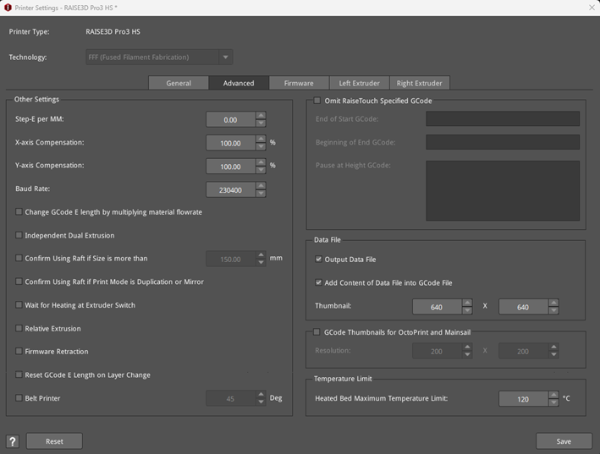
Figure 1: The Advanced tab in the Printer Settings panel.
